CSD smart card online apply, renewal, status and login
Preparing an upload? Use the photo resizer, then check the portal's current file requirements. For purchase eligibility, use the separate CSD entitlement checker.

Two doors, and most articles online mix them up. First-time applicants apply at their canteen (URC) on a physical form — the official portal says so itself. The CSD homepage calls csdsmartcard.co.in its renewal portal; inside that portal, the service is described as replacement of existing cards — grocery, liquor and dependent cards — at ₹165 per card (+ ₹60 courier convenience charge per application). Everything below is from that portal's own eligibility page, instructions and terms — read on 3 August 2026; helplines re-checked, and the full registration walked through ourselves, on 10 August 2026. The CSD homepage notice was re-checked on 26 August 2026.
CSD smart card online apply or physical form?
- Existing card holder, card worn out / lost / details changed: online, on csdsmartcard.co.in — the portal for "replacement of Grocery, Liquor, and Dependent canteen smart card(s)".
- Physical form at the canteen (URC) — the portal's
eligibility page lists exactly who must go this way:
- All first-time / new applicants.
- Beneficiaries not holding a PAN card.
- ESM with service below 5 years.
- Marital discord cases.
- BRO/GREF serving personnel.
- Serving defence civilians on deputation.
- Serving and retired defence civilians of the Directorate of Ordnance and of NCC.
- Veer Naris / NOK of fatal battle casualties.
- Differently-abled dependent children.
Canteen smart card application form — where it actually comes from
"Canteen smart card application form PDF" is one of the most-searched phrases around this card, so here is the plain answer: we have not found any official public download for the new-card form. First-time applicants get the form from their URC, fill it physically, and the URC forwards it — the portal's own eligibility page routes every new applicant that way, including widows, family pensioners and retired defence civilians. The online replacement flow runs on uploads in prescribed formats instead: Appendix A (promoted serving personnel), Appendix B (ESM without pension), Appendix D (fee-exempted categories). A "form PDF" on some other website is somebody's upload, not an official source — ask the URC before trusting it.
How to renew the canteen smart card, step by step
To renew a canteen smart card, apply online on csdsmartcard.co.in — officially the process is called replacement, and it covers a worn-out, lost or outdated grocery, liquor or dependent card. Register with the old card's ID and serial number, upload the documents, pay ₹165 per card (+ ₹60 courier charge), and watch the status in your login. The same steps, in detail:
- Keep the required documents ready (from the portal's Important Instructions): your own PAN (mandatory), working mobile number and email, and the card ID + serial number of your previous grocery/liquor card.
- Photos and signatures: single photo, joint photo with spouse, and dependent photos as applicable — each under 150 KB, in civil dress; signature images of self and dependents under 20 KB each. Files too big? Our free photo resizer shrinks them in your phone — nothing gets uploaded.
- Category document:
- ESM / widows / NOK with pension — PPO; the pay level must match the entitlement category you apply for.
- ESM without pension — Appendix B in the prescribed format.
- Serving personnel who have been promoted — Appendix A.
- Serving/retired defence civilians — current pay slip / PPO showing payment from Defence estimates.
- Fee-exempted categories (e.g. Chakra awardees) — Appendix D or the authorising document.
- Register on csdsmartcard.co.in — the registration runs on the previous card's ID and serial number — and fill the application form in your login. Screen by screen: the registration walkthrough below.
- Check twice, then pay. The portal warns that details must exactly match the uploaded documents — mismatch is a stated ground for rejection. Fee: ₹165 per card + ₹60 convenience charge per application for courier delivery. Non-refundable once paid, except failed transactions and duplicate payments (those refunds can take up to a month).
- Check the application status in your portal login — details, the no-application-number situation and the helpline are in the status section below.
- Rejected? In certain cases a reapply option is enabled — use it within 90 days of the application date.
Renewal date, validity, "renewal after 10 years": your card answers this itself — an "Expiry on …" date is printed on the canteen smart card. We checked our own grocery and liquor cards: both carry it, and both carry the same date. The rule behind that date — how many years a card runs — is not stated in any public official document we have found, so we will not guess it. Otherwise you replace the card when it is worn out, lost or the details have changed; when your printed expiry nears, ask your URC which route to take — their current instruction governs.
CSD smart card status — how to track the application
The status of an online replacement application shows inside your login on csdsmartcard.co.in — there is no separate tracking site or app; your profile is editable in the same login. Two situations worth knowing:
- Payment done but no application number generated: write to helpdesk@csdsmartcard.co.in with the transaction details, or call the helpline below — mention your PAN in the mail.
- Physical form given at the URC: its progress does not show on the online portal — the URC that forwarded your form is the place to ask.
And no, there is no app for this. We have found no official app for the card portal — so treat any Play Store "CSD" app as a stranger: never type your card number, PAN or OTP into one. The application, status and profile live on csdsmartcard.co.in, in the browser.
CSD smart card login, registration and password
csdsmartcard.co.in is the official portal — its content belongs to the Canteen Services Directorate, QMG Branch, IHQ of MoD (Army), and the government's own AFD shopping site points to it as the canteen card renewal portal. So the .co.in address need not worry you; what should worry you are lookalike sites — type the address yourself rather than tapping ads.
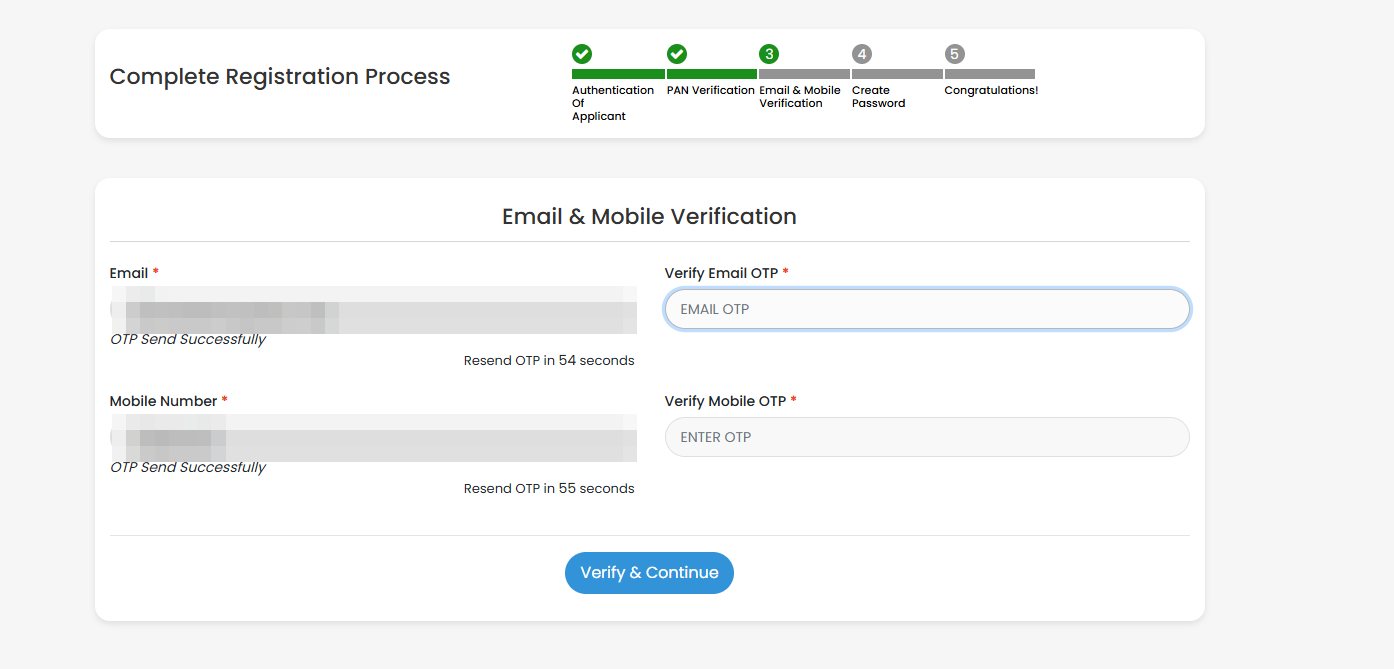
We walked through the registration ourselves on 10 August 2026. Five screens come, in this order:
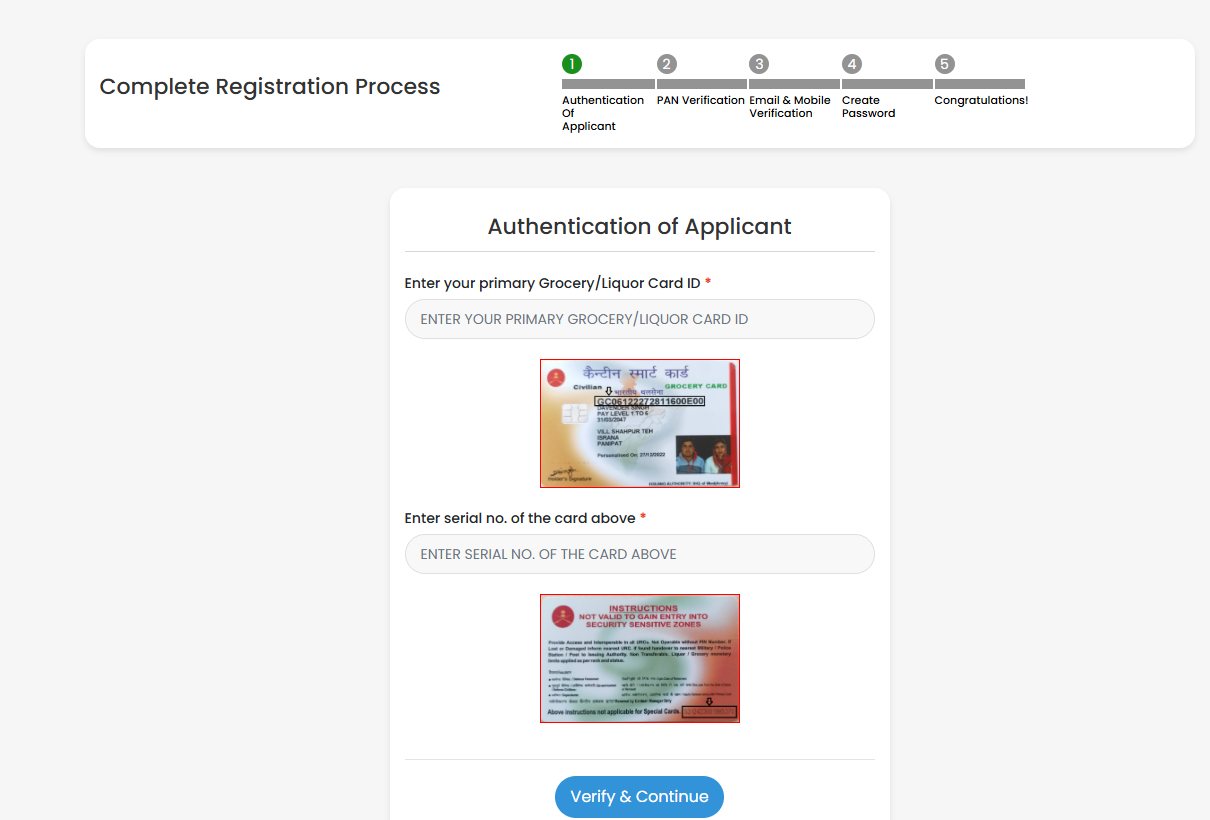
- Authentication of Applicant — your primary grocery/liquor card ID, then that card's serial number. The screen shows a sample card with both numbers marked — which settles the "chip number" question.
- PAN Verification — PAN number, your name exactly as printed on the PAN card, and date of birth.
- Email & Mobile Verification — one OTP on the email and one on the mobile, both required; the resend option opens after about a minute.
- Create Password — at least 8 characters; the portal wants uppercase, lowercase, numbers and special characters mixed.
- Congratulations — registered. The application itself is filled after logging in.
Login works with PAN or mobile number, plus the password and a captcha. Five wrong attempts lock the account — if the password will not come to mind, use "Forgot Password?" rather than guessing.
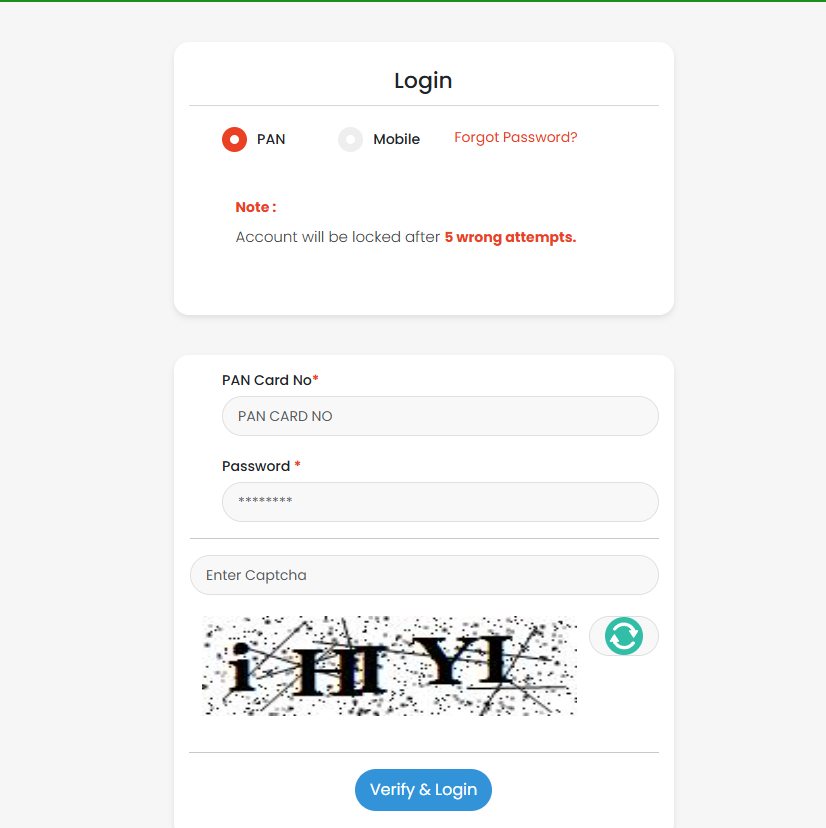
- The login is for card applications only: upload documents, pay, edit your profile and watch the application status. It is not a shopping login — AFD purchases happen on afd.csdindia.gov.in with its own registration.
- Login trouble? The smart card helpline is 0120-4699900 — all numbers below.
The online form after login — five screens
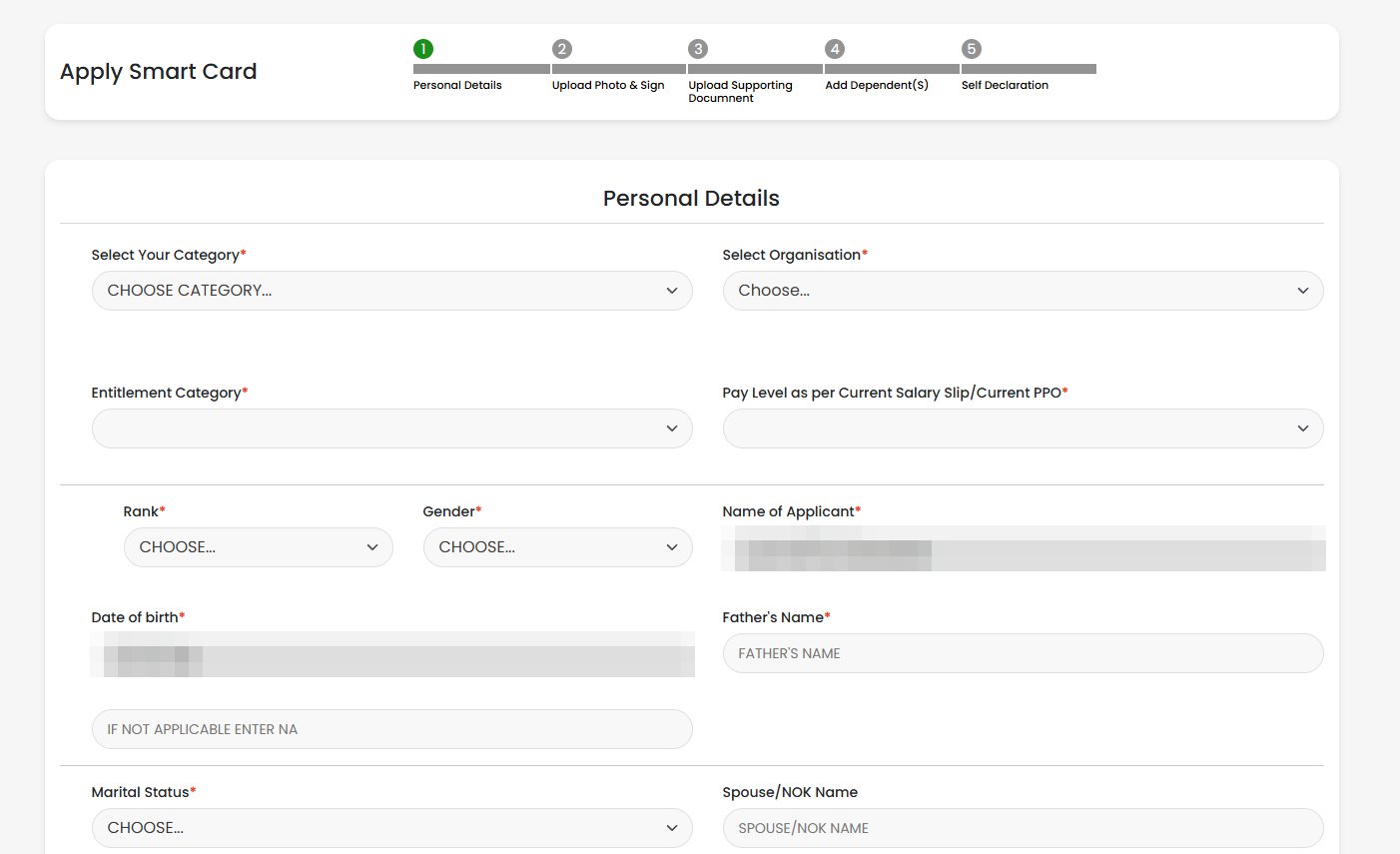
The application ("Apply Smart Card") also runs in five steps: Personal Details → Upload Photo & Sign → Upload Supporting Document → Add Dependent(s) → Self Declaration. The first screen asks for your category, organisation, entitlement category, pay level as per the current salary slip or PPO, rank, father's name (type NA where not applicable), marital status, spouse/NOK name, and the dates of joining and retirement/release. Your name and date of birth arrive pre-filled from PAN verification and locked — one more reason the PAN details must be exact. Keep the photos, signatures and the PPO/pay-slip file ready in the sizes listed in the steps above before you start — the free photo resizer gets each file under its limit without uploading it anywhere.
Card ID, serial number and chip number
Many people search for the canteen card's "chip number" — usually midway through a registration that asks for card details. The registration screen itself settles it: it shows a sample card with both numbers marked.
- Card ID — printed on the front of the card, by the chip, in the line just above the holder's name; on a grocery card it starts with GC. This front number is what most people mean by "chip number".
- Serial number — the 16-digit number printed on the back of the card, at the bottom, right beside the line "Above instructions not applicable for Special Cards". This is what the online registration asks for as "serial no. of the card above".
Keep both numbers to yourself. The card ID and this 16-digit serial number are all the portal needs to start a registration in your name — never share them on a phone call, on WhatsApp, or with an "agent" offering to renew the card. Type them yourself on csdsmartcard.co.in, nowhere else.
If either number is worn off or unreadable, ask your URC before starting the online form — a wrong number at registration is exactly the kind of mismatch the portal warns can end in rejection.
Dependent, widow and family-pensioner cards
- Widows and family pensioners hold their own card — the entitlement is theirs in their own right. On the online replacement route their category document is the PPO, and the pay level on it must match the entitlement category applied for.
- Veer Naris and NOK of fatal battle casualties apply through the URC on the physical form — the portal's eligibility page routes them there.
- Dependent cards ride on the same application — the portal replaces grocery, liquor and dependent cards, and the online form has its own "Add Dependent(s)" step. Each dependent needs a photo under 150 KB in civil dress and a signature image under 20 KB (resizer).
- Differently-abled dependent children are on the eligibility page's list for the URC's physical route.
CSD smart card helpline numbers
- Smart card portal (application, payment, status): 0120-4699900 · helpdesk@csdsmartcard.co.in — Monday to Saturday, 10 AM–6 PM; 2nd and 4th Saturday closed. Mention your PAN and application number in any mail.
- AFD portal — registration and login issues: 0120-4699923 · WhatsApp 9582250281.
- AFD portal — general helpdesk: 0120-6933434 — 9 AM–6 PM, all seven days.
Nobody at these numbers — or anywhere else — legitimately asks for an OTP to "speed up" a card. Treat any such call as fraud.
What the card gets you (and how often)
From the CSD's own FAQ: AFD items like a television, refrigerator or washing machine can be bought once in three years, and a two-wheeler likewise every three years; car purchase has rank-wise ceilings, and only models listed with CSD are available. AFD-I purchases now run through the AFD portal, afd.csdindia.gov.in, with your card details. Prices differ from depot to depot because state taxes differ. What your rank can buy, and in what quantity — check it in our CSD entitlement checker, which cites the rates file behind every answer.
What we are deliberately not telling you
- The validity rule: your card's own "Expiry on" date is printed on it — read yours there. But the rule behind it (how many years a card runs) is not stated in any public official document we have found, so this page does not quote one. If the URC tells you a rule, theirs governs.
- "CSD canteen near me": we do not publish canteen locations — that is a standing rule of this site for security reasons. Your unit, Station HQ or zila sainik board knows your nearest URC.
Questions and answers
How do I apply for a CSD canteen smart card for the first time?
Through your canteen (URC), on a physical application form — the official online portal's own eligibility page says all first-time and new applicants must apply through physical forms through the canteen. The same applies to beneficiaries without a PAN card, ESM with under 5 years of service, Veer Naris and NOK of fatal battle casualties, and some other listed categories. The online portal is only for replacing existing cards.
How do I renew my canteen smart card?
Online, on csdsmartcard.co.in — officially it is a replacement. Register with the card ID and serial number of your old grocery/liquor card, upload PAN, photos, signatures and your PPO or pay slip, pay ₹165 per card plus the ₹60 convenience charge, and track the status in your login. There is no published validity period or renewal date — you replace the card when it is worn out, lost or the details have changed. A first-time card is not a renewal; that starts at the URC with a physical form.
What is the validity of the CSD smart card?
Look at the card — an "Expiry on …" date is printed on the canteen smart card itself. We checked our own grocery and liquor cards; both carry the same printed date. No public official document we have found states how many years a card runs, so we won't guess the rule. When your printed expiry nears, ask your URC which route they want you to take.
What is csdsmartcard.co.in for?
It is the official online portal for existing canteen smart card holders to apply for replacement of their grocery, liquor and dependent cards. The portal's content belongs to the Canteen Services Directorate, QMG Branch, IHQ of MoD (Army); it is hosted by PS Quick IT Pvt Ltd. You register with your existing card ID and serial number, upload documents, pay, and can track the application status in your login.
What documents does the online CSD card application need?
Per the portal's Important Instructions: your own PAN number (mandatory), a working mobile number and email, the card ID and serial number of your previous grocery/liquor card, photos in civil dress (single, joint with spouse, and dependents — each under 150 KB), signature images under 20 KB, and knowledge of your pay level as per your pay slip or PPO. Pensioners upload the PPO, and the pay level must match the entitlement category applied for; ESM without pension use Appendix B; serving personnel who were promoted use Appendix A.
How much does the CSD smart card cost?
On the official online portal: ₹165 per smart card, plus a ₹60 convenience charge per application for direct delivery by courier. Fees are non-refundable once paid, except for failed online transactions or duplicate payments. Chakra awardees and other exempted categories upload Appendix D or an authorised document instead of paying.
What if my CSD card application is rejected?
The portal says incorrect or incomplete information can lead to rejection. In certain rejection cases a reapply option is enabled, which must be used within 90 days of the application date. Ensure every detail entered exactly matches the uploaded documents before submitting.
How do I check my CSD smart card status?
Log in on the official portal, csdsmartcard.co.in — the application status shows inside your login, and your profile is editable there too. There is no separate tracking site or app. If payment succeeded but no application number was generated, write to helpdesk@csdsmartcard.co.in with the transaction details, or call 0120-4699900 (Monday–Saturday 10 AM–6 PM, 2nd and 4th Saturday closed). A physical form given at the URC is not trackable online — ask the URC that forwarded it.
What is the CSD smart card helpline number?
For the smart card portal: 0120-4699900 and helpdesk@csdsmartcard.co.in, Monday to Saturday, 10 AM–6 PM, 2nd and 4th Saturday closed — mention your PAN and application number in any mail. For the AFD shopping portal: 0120-4699923 or WhatsApp 9582250281 for registration and login issues, and 0120-6933434 as the general helpdesk (9 AM–6 PM, all seven days).
Where do I find my canteen smart card ID, serial number or chip number?
The registration screen on csdsmartcard.co.in shows a sample card with both numbers marked. The card ID is printed on the front of the card, by the chip, in the line just above the holder's name — on a grocery card it starts with GC; this front number is what most people mean by "chip number". The serial number is the 16-digit number printed on the back of the card, at the bottom, beside the "Above instructions not applicable for Special Cards" line. Share neither number with anyone — the online registration runs on them; type them yourself on csdsmartcard.co.in only. If either number is worn off, ask your URC before starting the online form.
Where this information comes from
- csdsmartcard.co.in — Eligibility Conditions (read 3 August 2026): online = replacement only; the categories that must apply physically through the canteen.
- csdsmartcard.co.in — Important Instructions (read 3 August 2026): PAN/mobile/email/card-ID requirements, photo and signature size limits, category documents (Appendices A/B/D, PPO with matching pay level), rejection and 90-day reapply rule.
- csdsmartcard.co.in — Terms & Conditions (read 3 August 2026): ₹165 per card + ₹60 convenience charge, refund rules, ownership by the Canteen Services Directorate, QMG Branch, IHQ of MoD (Army), hosting by PS Quick IT Pvt Ltd.
- csdindia.gov.in — FAQ (archived copy, April 2025 snapshot): AFD items and two-wheelers once in three years, rank-wise car ceilings, listed models only, state-tax price differences.
- csdsmartcard.co.in — Contact Us (read 10 August 2026): helpline 0120-4699900, helpdesk email, Monday–Saturday 10 AM–6 PM, 2nd/4th Saturday closed, PAN and application number to be mentioned in mails.
- afd.csdindia.gov.in (read 10 August 2026): points to csdsmartcard.co.in as the canteen card renewal portal; AFD helpdesk numbers — 0120-4699923 / WhatsApp 9582250281 for registration and login, 0120-6933434 general (9 AM–6 PM, Monday–Sunday).
- csdsmartcard.co.in — registration and application flow, walked through ourselves (10 August 2026): the five registration screens, PAN + double OTP + password rules, PAN-or-mobile login with captcha and the 5-attempt lock, the five application screens, and the on-screen sample card marking where the card ID and serial number sit.
- Our own grocery and liquor canteen smart cards (checked 10 August 2026): both carry a printed "Expiry on …" date — the same date on both.
Important note
Fees, forms and portal rules can change with the Canteen Services Directorate's instructions — what the portal and your URC say today governs. This is a private website with no connection to CSD; nobody here can make or speed up a card.
Spotted a mistake? Tell us — corrections are recorded in public.