SPARSH Change of FMA Option
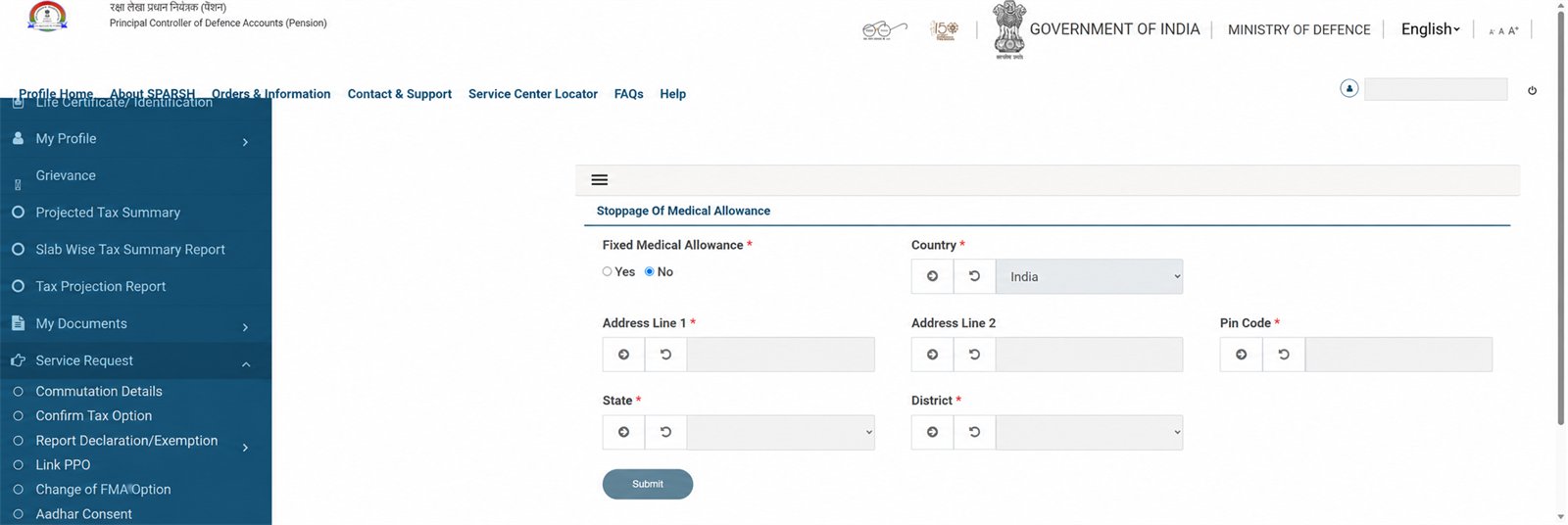
The captured portal opens Service Request → Change of FMA Option as a form titled “Stoppage of Medical Allowance.” Changing or stopping Fixed Medical Allowance can affect how medical allowance/medical-facility arrangements are recorded. Confirm your entitlement and intended result with the Record Office, ECHS/medical authority or official SPARSH support before submitting.
Open the correct service request
Log in at the official portal and open Service Request → Change of FMA Option. Check the page title before touching any control.
Read the action, not just the menu label
On the captured account, the actual page title was Stoppage of Medical Allowance. If your purpose is to start, restore or change FMA—not stop it—confirm that this is the correct workflow before proceeding.
Review the current FMA state
The form displays a required Fixed Medical Allowance Yes/No control and registered country/address fields. Do not copy the example state shown in a screenshot; your current account and entitlement govern.
Verify address details
The request uses country, address, pin code, state and district. If they are wrong or locked, correct the profile through the proper profile service request or official support first.
Submit only after official confirmation
Take a privacy-safe note of the acknowledgement/service-request number, then track it through Track Status / Track Service Request. Do not file duplicates while it is pending.
The visible captured screen did not state a universal document list. Requirements can depend on the requested change and pensioner category. Follow the documents requested inside your own workflow or confirm them with official support; do not rely on an invented checklist.
Important
This page explains where the form is; it does not decide whether FMA or a medical facility is better for you. Sainik Desk did not change or submit any option while capturing the screen.
Related: Complete account guide · Grievance guide · ECHS guide